> For the complete documentation index, see [llms.txt](https://www.konwallet.info/llms.txt). Markdown versions of documentation pages are available by appending `.md` to page URLs; this page is available as [Markdown](https://www.konwallet.info/vn/lien-quan-den-thanh-toan/manual.md).
# Cách thanh toán tại cửa hàng chấp nhận KONWallet
**Dịch vụ thanh toán tại cửa hàng bằng KONWallet đã chính thức ra mắt, và sau đây là hướng dẫn sử dụng!**\
Bạn có thể sử dụng dịch vụ thanh toán này **một cách cực kỳ đơn giản**, chỉ cần làm theo từng bước dưới đây nhé :)
😃 Bây giờ, hãy cùng thử thanh toán tại cửa hàng chấp nhận KONWallet!
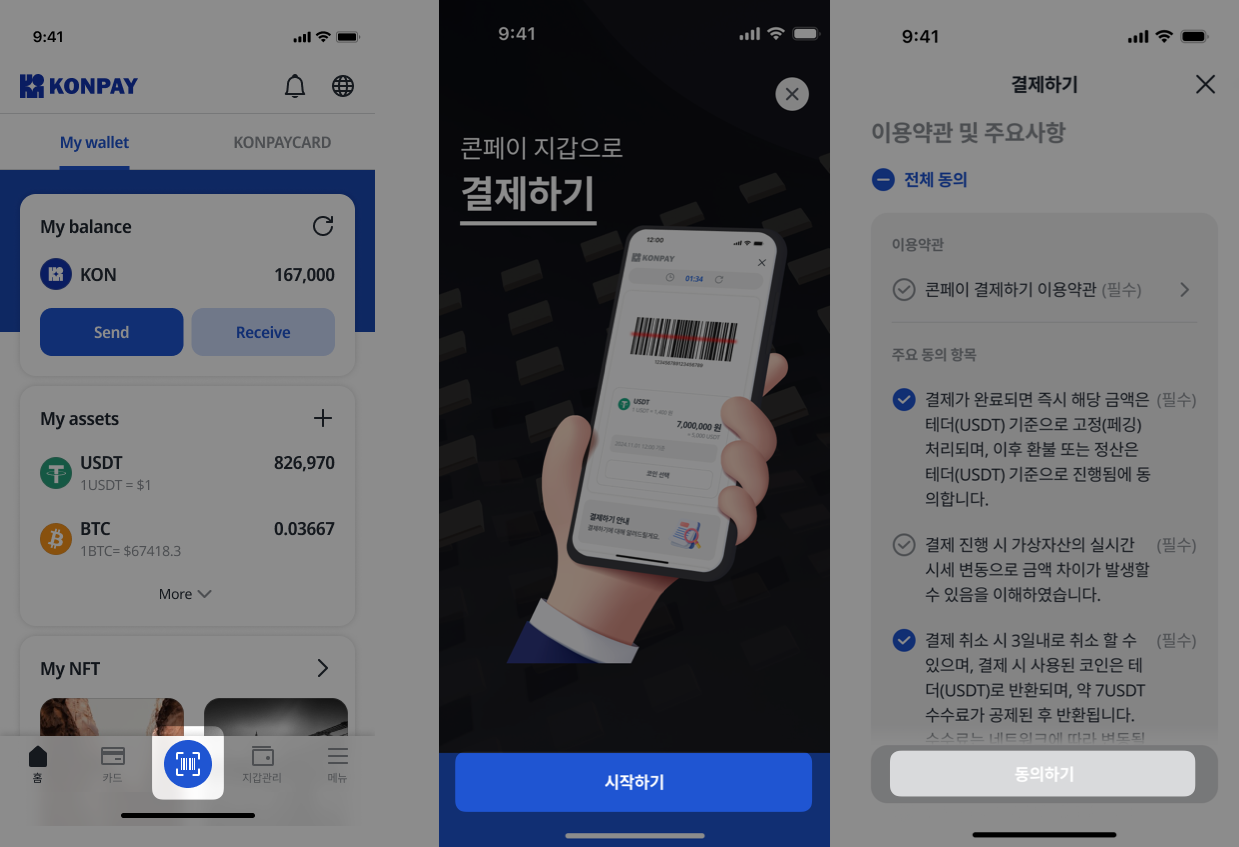
### STEP 1. **Truy cập màn hình thanh toán (biểu tượng mã vạch)**
* Nhấp vào biểu tượng mã vạch ở thanh dưới cùng, sau đó **đồng ý với điều khoản sử dụng và các thông tin quan trọng** trong mục "Thanh toán".
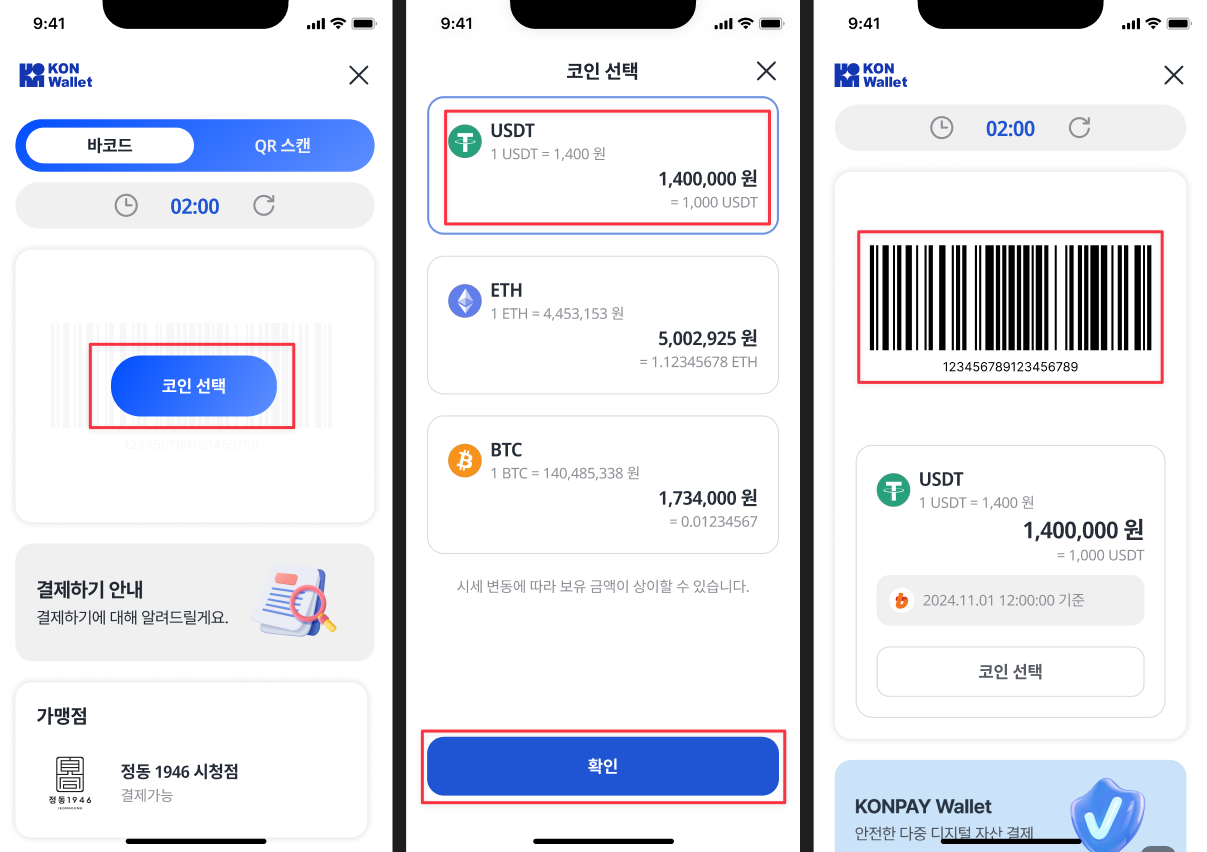
### STEP 2. Sau khi chọn loại coin muốn sử dụng, **mã vạch thanh toán sẽ được tạo ra**.
* Sau khi chọn loại coin, nếu bạn đang sở hữu đủ số dư để thanh toán, **mã vạch sẽ được tạo ra dựa trên số coin bạn có thể sử dụng để thanh toán**.
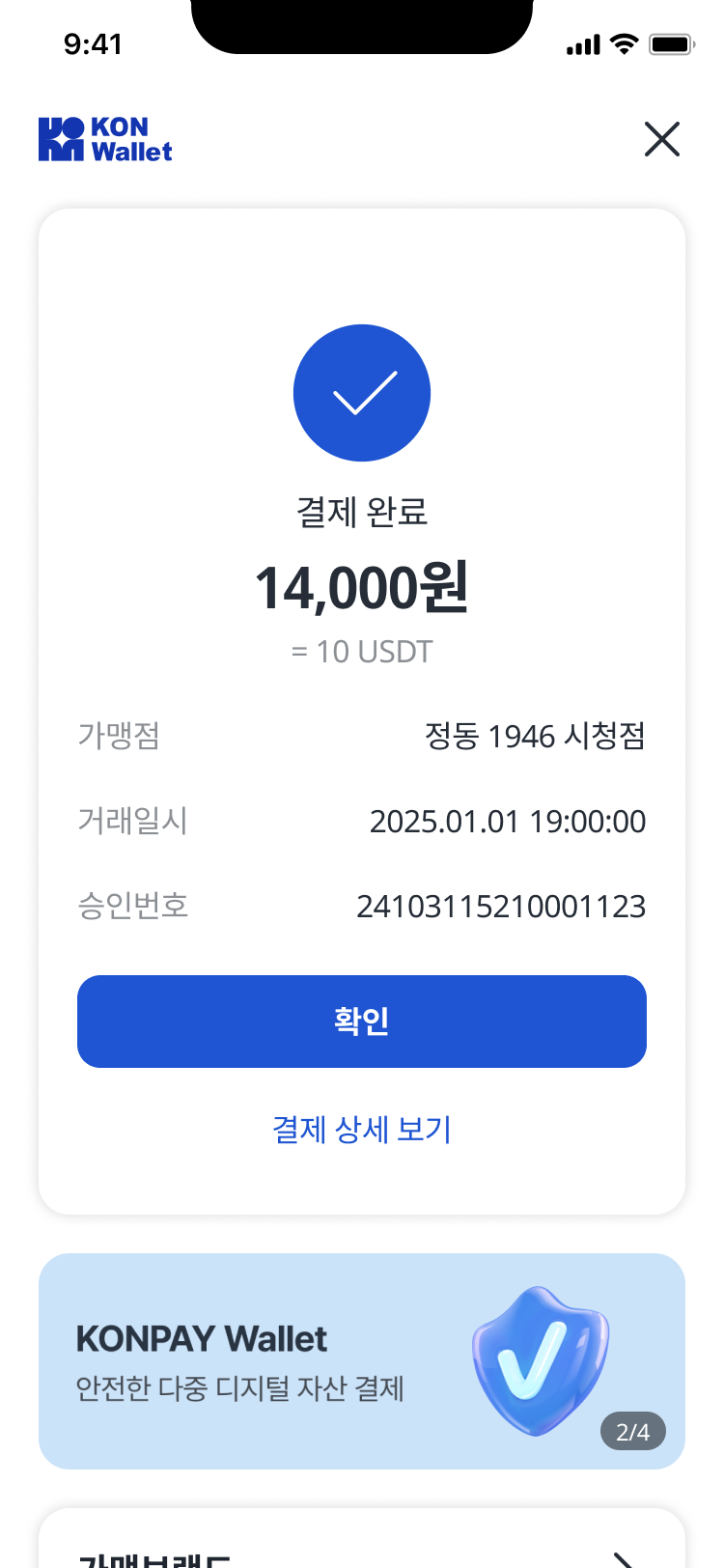
* Khi cửa hàng chấp nhận quét mã vạch và xác nhận thanh toán, **màn hình của người dùng sẽ hiển thị thông báo hoàn tất giao dịch**.
### 🎉 Bạn đã hoàn tất thanh toán tại cửa hàng bằng KONWallet!
* **Đi đến chính sách thanh toán tại cửa hàng KONWallet**
{% content-ref url="/pages/NDlxwuZeivoEShdrUQxP" %}
[Hướng dẫn thanh toán tại cửa hàng chấp nhận KONWallet](/vn/lien-quan-den-thanh-toan/info.md)
{% endcontent-ref %}
* **Đi đến Điều khoản sử dụng dịch vụ thanh toán tại cửa hàng KONWallet**
{% content-ref url="/pages/Lxp3rIGKqQ8ayuh3tLSb" %}
[Điều khoản sử dụng dịch vụ thanh toán tại cửa hàng KONWallet (Tiếng Hàn)](/vn/chinh-sach-konpaycard/payment.md)
{% endcontent-ref %}
{% hint style="info" %}
Lưu ý khi sử dụng dịch vụ thanh toán tại cửa hàng KONWallet
{% endhint %}
**Liên quan đến thanh toán**
* Thanh toán tại cửa hàng bằng KONWallet là một dịch vụ trung gian, hỗ trợ người dùng sử dụng **tài sản số mà họ sở hữu** để mua hàng hóa và dịch vụ tại các **cửa hàng đã ký hợp đồng riêng** với công ty.
* Tài sản số được dùng để thanh toán sẽ được **bán ra theo thời gian thực** và được **cố định theo tỷ giá USDT (pegging)** tại thời điểm thanh toán. Điều này giúp **giảm thiểu rủi ro do biến động giá tài sản số**.\
(*Thời điểm bán có thể thay đổi tùy theo chính sách vận hành.*)
* Dịch vụ thanh toán chỉ áp dụng tại **các cửa hàng được chỉ định**, và các cửa hàng mới sẽ được **thông báo riêng** trong tương lai.
* Thanh toán bằng tài sản số **không hỗ trợ xuất hóa đơn VAT hoặc khấu trừ thuế thu nhập cá nhân.**\
*(Tham chiếu: Bộ Kế hoạch và Tài chính Hàn Quốc – Văn bản số 162 ngày 12.03.2021)*
**Biến động giá & phí giao dịch**
* Do tính chất của tài sản số, **giá trị thanh toán thực tế có thể khác so với dự kiến** tại thời điểm người dùng thực hiện thanh toán. Vui lòng lưu ý sự chênh lệch có thể xảy ra.
* Thời điểm người dùng gửi yêu cầu thanh toán sẽ được **ghi lại và lưu trữ** nhằm đảm bảo không xảy ra sai lệch thông tin giữa người dùng và công ty.
**Chính sách hủy giao dịch & hoàn tiền**
* Việc hủy thanh toán cần được thực hiện **trong vòng 3 ngày**, bằng cách **trực tiếp đến cửa hàng** và **thực hiện lại thanh toán**, sau đó yêu cầu hủy sẽ được tiếp nhận.
* Coin đã sử dụng để thanh toán sẽ được **hoàn trả bằng USDT**, sau khi **khấu trừ khoảng 7 USDT phí xử lý**.
* Tiền hoàn lại thường được xử lý **trong vòng trung bình 7 ngày**, và **phí có thể thay đổi tùy theo mạng lưới blockchain**.
* **Chính sách hủy giao dịch có thể khác nhau tùy từng cửa hàng.**
***
### Bạn có thắc mắc gì thêm về KONWallet không?
{% content-ref url="/pages/xyLBazeqS3ZZpAYnsBk4" %}
[Tạo ví KONWallet](/vn/cai-dat-ung-dung/createwallet.md)
{% endcontent-ref %}
{% content-ref url="/spaces/KBCccPbXzfAZJmtVJZwe/pages/uX6sPsTLNC3c0ZfjWz3C" %}
[Khôi phục ví KONWallet](/vn/cai-dat-ung-dung/backupwallet.md)
{% endcontent-ref %}
{% content-ref url="/spaces/KBCccPbXzfAZJmtVJZwe/pages/E0DyTbuDrIZJ3czZDajV" %}
[Hướng dẫn màn hình chính](/vn/cai-dat-ung-dung/homeinfo.md)
{% endcontent-ref %}
{% content-ref url="/spaces/KBCccPbXzfAZJmtVJZwe/pages/rzHG8BS94ER0n0uEhe2O" %}
[Giới thiệu màn hình quản lý ví](/vn/cai-dat-ung-dung/walletinfo.md)
{% endcontent-ref %}
{% content-ref url="/spaces/KBCccPbXzfAZJmtVJZwe/pages/A4W0t8SMZxI9zw89cYIT" %}
[Câu hỏi thường gặp (FAQ)](/vn/cai-dat-ung-dung/cau-hoi-thuong-gap-faq.md)
{% endcontent-ref %}