> For the complete documentation index, see [llms.txt](https://www.konwallet.info/llms.txt). Markdown versions of documentation pages are available by appending `.md` to page URLs; this page is available as [Markdown](https://www.konwallet.info/vn/lien-quan-den-nft/withdraw.md).

# Rút NFT

## Hãy gửi NFT tặng cho người thân của bạn thông qua tính năng **rút NFT**!

Việc rút NFT rất đơn giản, nhưng bạn cần **nạp phí (KONET)** vào địa chỉ NFT để thực hiện giao dịch.\
Cùng làm theo hướng dẫn nhé!

### STEP 1. Nhập thông tin rút NFT

<div align="left"><figure><img src="/files/XhRtxlpfm1Q8URGObFGd" alt=""><figcaption></figcaption></figure></div>

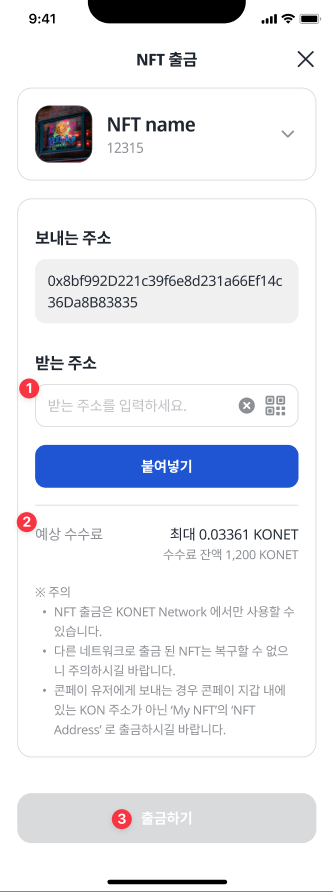
1. Vui lòng nhập **Địa chỉ nhận (To Address)**.
2. Bạn có thể kiểm tra **phí dự kiến** và **xác nhận số dư KONET đã được nạp sẵn**.
3. Nhấn **Rút NFT** để thực hiện giao dịch.

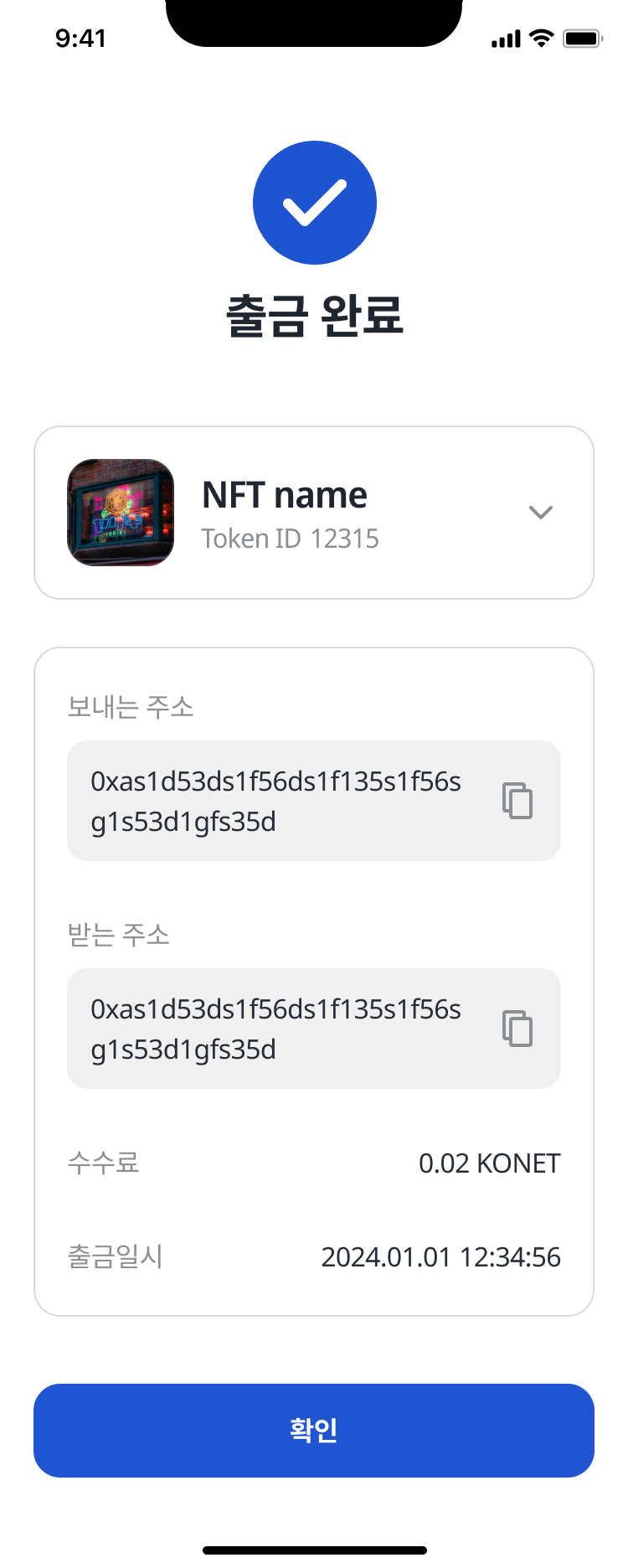
### STEP 2. Hoàn tất rút NFT

<div align="left"><figure><img src="/files/Ec8sXjGXcVSy7MBeW1c2" alt="" width="375"><figcaption></figcaption></figure></div>

{% hint style="danger" %}
NFT chỉ được coi là rút thành công khi **giao dịch thực tế trên blockchain được xử lý thành công**.\
Trong quá trình xử lý, NFT có thể vẫn hiển thị trong ví, nhưng **không thể thực hiện rút lại**.

*Lưu ý: Tốc độ rút NFT có thể bị chậm tùy thuộc vào môi trường mạng.*
{% endhint %}

---

# Agent Instructions
This documentation is published with GitBook. GitBook is the documentation platform designed so that both humans and AI agents can read, navigate, and reason over technical content effectively. Learn more at gitbook.com.

## Querying This Documentation
If you need additional information that is not directly available in this page, you can query the documentation dynamically by asking a question.

Perform an HTTP GET request on the current page URL with the `ask` query parameter:

```
GET https://www.konwallet.info/vn/lien-quan-den-nft/withdraw.md?ask=<question>
```

The question should be specific, self-contained, and written in natural language.
The response will contain a direct answer to the question and relevant excerpts and sources from the documentation.

Use this mechanism when the answer is not explicitly present in the current page, you need clarification or additional context, or you want to retrieve related documentation sections.