> For the complete documentation index, see [llms.txt](https://www.konwallet.info/llms.txt). Markdown versions of documentation pages are available by appending `.md` to page URLs; this page is available as [Markdown](https://www.konwallet.info/vn/gui-va-rut-tien/addasset.md).
# Thêm tài sản số
Đây là hướng dẫn cách thêm tài sản số được hỗ trợ bởi KONWallet.\
Có tổng cộng **2 cách** để thêm tài sản số: từ **màn hình chính** hoặc **tab Quản lý ví**.
{% hint style="danger" %}
Chúng tôi sẽ hướng dẫn bạn cách thêm tài sản số từ **màn hình chính** và từ **Quản lý ví**.
{% endhint %}
### STEP 1. Thêm tài sản số từ màn hình chính
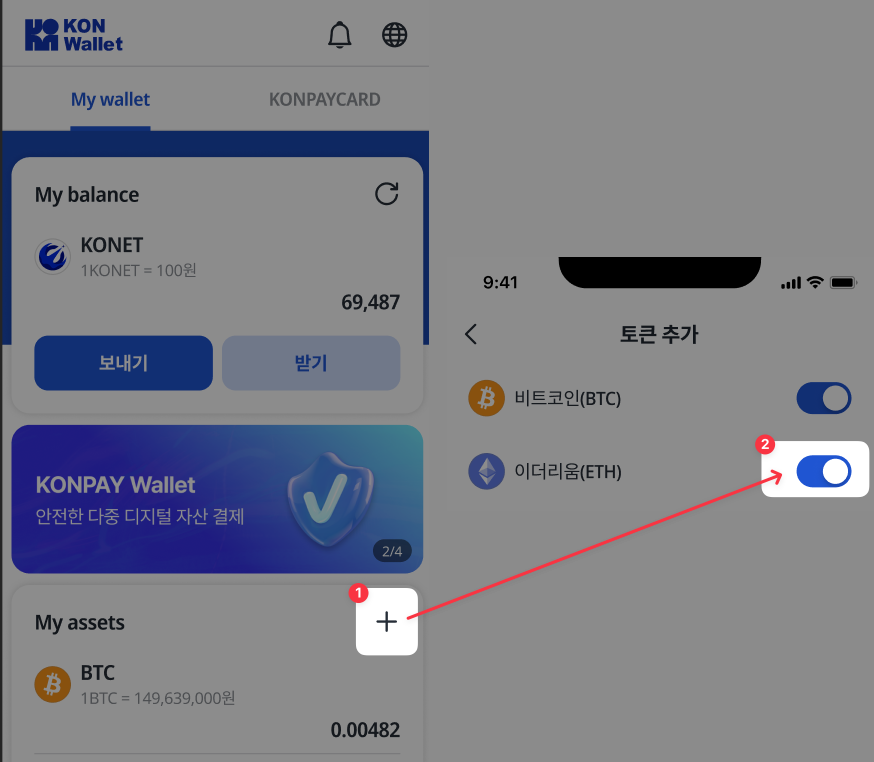
Cách thêm tài sản số từ màn hình chính như sau:
1. Nhấp vào nút "+" bên phải mục "Tài sản của tôi"
2. Màn hình sẽ chuyển sang giao diện **thêm token**, tại đây bạn có thể sử dụng **nút radio** để chọn token muốn thêm.\
(Token được thêm sẽ ngay lập tức được cấp địa chỉ nạp tiền, và bạn có thể xem địa chỉ ví trong trang nạp tiền.)
### STEP 2. Thêm tài sản số từ mục Quản lý Ví
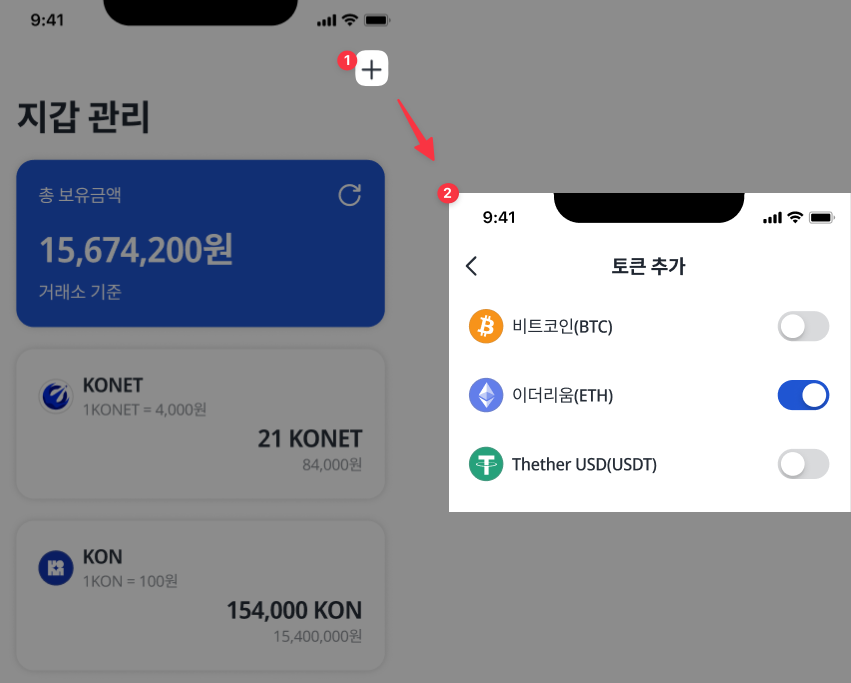
Cách thêm tài sản số từ mục Quản lý Ví như sau:
1. Nhấp vào nút "+" ở góc trên bên phải của màn hình Quản lý Ví.
2. Màn hình sẽ chuyển sang giao diện thêm token, tại đây bạn có thể sử dụng nút radio để chọn token muốn thêm.\
(Token được thêm sẽ ngay lập tức được cấp địa chỉ nạp tiền, và bạn có thể xem địa chỉ ví trong trang nạp tiền.)
Chúng ta vừa tìm hiểu cách thêm tài sản số trong KONWallet.