> For the complete documentation index, see [llms.txt](https://www.konwallet.info/llms.txt). Markdown versions of documentation pages are available by appending `.md` to page URLs; this page is available as [Markdown](https://www.konwallet.info/setting/help.md).
# 고객센터 접수하기
콘월렛을 사용하시면서 궁금하신 내용이나 문의사항이 있다면 언제든지 고객센터로 이메일 접수하시길 바랍니다.\
콘월렛은 현재 "이메일 고객센터"를 운영중에 있으며, 365일 24시간 언제든지 이메일 접수 및 문의하실 수 있습니다.
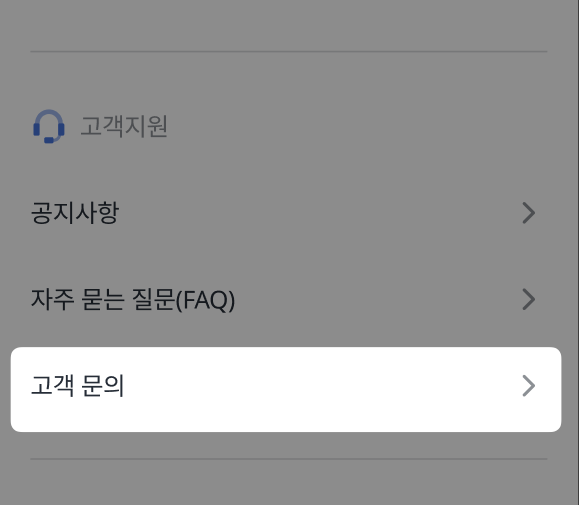
### STEP 1. 메뉴에 진입하여 "고객지원" 확인
고객지원 카테고리에는 고객문의를 클릭하여 확인합니다.
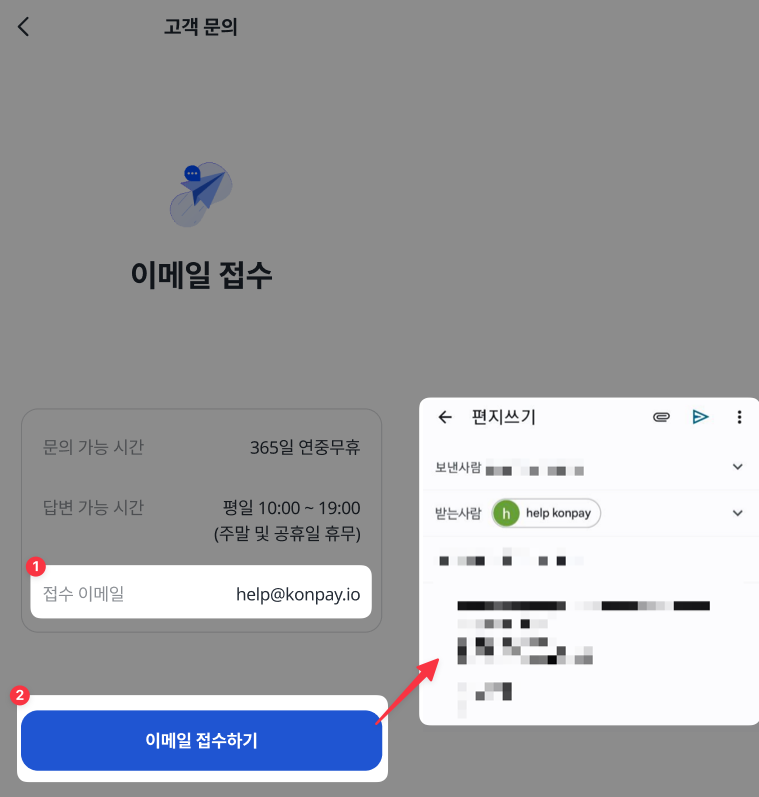
### STEP 2. 이메일 접수하기 클릭
모바일 기기에 기본 이메일 기능을 추가해놓은 기기라면 "이메일 접수하기"버튼을 클릭하면 이메일 앱 기능이 활성화됩니다.
{% hint style="danger" %}
기본 메일앱이 설정되어있지 않으면 해당 기능은 이용할 수 없습니다.\
꼭 기본 메일앱을 설정해주세요. 단 하단 이메일을 통해 개별로 접수하셔도 무관합니다.\
자세하게 문의사항을 접수하시면 더욱 빠른 상담에 도움이 됩니다.\
신속하고 친절하게 사용자분의 해결을 위해 노력하겠습니다.
\
✅ **고객센터 이메일 : **
✅ 문의 가능 시간 : 365일 연중무휴
✅ 답변 가능 시간 : 평일 10:00 \~ 19:00
{% endhint %}