> For the complete documentation index, see [llms.txt](https://www.konwallet.info/llms.txt). Markdown versions of documentation pages are available by appending `.md` to page URLs; this page is available as [Markdown](https://www.konwallet.info/app/walletinfo.md).
# 지갑관리 화면 안내
### 1. 지갑관리 화면 구성 안내
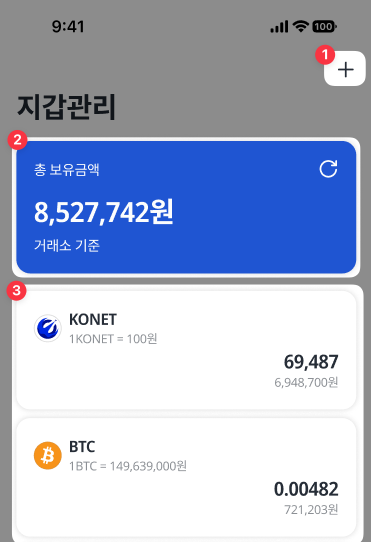
콘월렛의 **"지갑관리"** 화면 구성을 이미지 순서대로 안내드립니다.
{% hint style="danger" %}
표시 된 가격은 이해를 돕기위한 가격이며 실제 가격과 상이합니다.
{% endhint %}
1. 코인추가 : 콘월렛에 리스팅 되어있는 코인・토큰을 추가하는 영역
2. 총 보유금액 : 내가 보유한 총 자산의 합계(거래소 단순 가격 합산 기준)
3. 코인선택 : 해당 코인에 대해 입출금,입출금내역을 확인할 수 있는 영역
### 2. 지갑관리의 코인 선택 화면
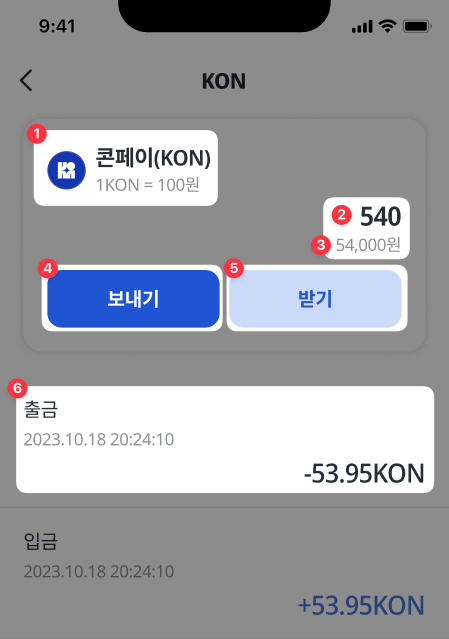
지갑관리 > 코인선택 후 화면 구성을 이미지 순서대로 안내드립니다.
{% hint style="danger" %}
표시 된 가격은 이해를 돕기위한 가격이며 실제 가격과 상이합니다.
{% endhint %}
1. 코인이름과 거래소 기준 1개당 시세 확인
2. 현재 내가 보유중인 수량을 표기
3. 현재 내가 보유중인 수량 기준 합산금액을 표기
{% hint style="info" %}
```
계산식 : 현재개당시세 x 보유수량 = 합산금액
* 한국어(KRW),일본어,영어($),베트남(VND)로 표기됩니다.
```
{% endhint %}
4. 코인 출금 기능
5. 코인 입금 기능
6. 입출금 내역을 상세하게 볼 수 있는 영역
이렇게 지갑관리 화면의 기능에 대해서 알아보았습니다. 사용자가 사용하고 싶은 코인들을 추가하여 콘월렛의 기능을 활용해보세요. 콘월렛은 안전한 지갑 서비스를 위해 늘 최선을 다하고 있습니다.