> For the complete documentation index, see [llms.txt](https://www.konwallet.info/llms.txt). Markdown versions of documentation pages are available by appending `.md` to page URLs; this page is available as [Markdown](https://www.konwallet.info/app/homeinfo.md).
# 홈 화면 안내
🎉 지갑 생성을 축하드립니다!
지갑 생성 후 처음으로 마주하는 홈 화면에 대해서 설명해드릴게요! \
홈화면을 2분할 하여 더욱 잘보이도록 설명해드리겠습니다. 콘월렛은 더 많은 기능을 탑재하고 사용자의 편의성을 위해 열심히 개발중에 있으니 지켜봐주세요.
***
### 1-1. 홈 화면 구성 안내(상단)
콘월렛의 홈 화면 구성을 이미지 순서대로 안내드립니다.
1. **알림 :** 입출금 또는 소식을 받았을때 확인할 수 있는 알림
2. **언어선택 :** 국가 별 언어를 변경할 수 있는 언어선택 기능
3. **My Balance :** 자산을 보유하고 있는 총 금액
4. **Banner :** 콘월렛의 중요 소식을 보여주는 배너 영역
***
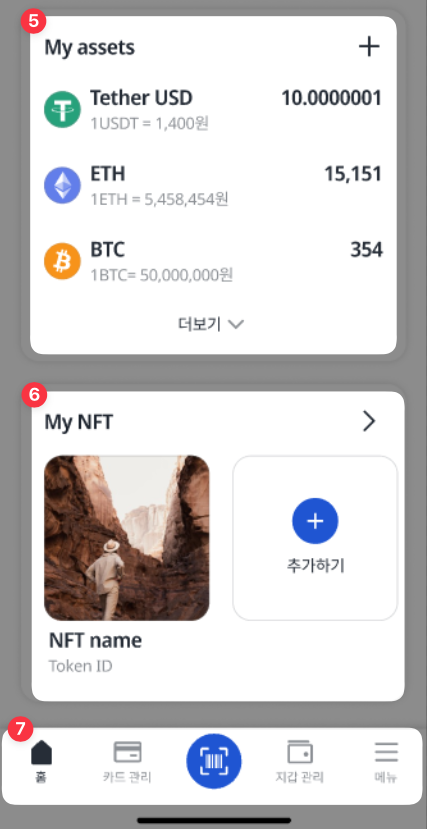
### 1-2. 홈 화면 구성 안내(하단)
5. **My Assets :** 추가한 코인을 빠르게 확인하는 영역
6. **My NFT :** 보관 중인 NFT 확인 및 NFT 페이지 진입하는 영역
7. **네비게이션바 :** 홈,카드관리,결제,지갑관리,메뉴를 빠르게 진입하는 영역
콘월렛 홈 화면이 익숙해진다면 필요한 기능을 빠르게 진입하여 편리하게 사용할 수 있습니다.